Showing posts with label notifications. Show all posts

Thursday, September 27, 2012

Announcements and email


Announcements in the Hub are linked to QMU email. If you create an announcement in a module in the Hub, anyone on the module (students, teaching assistants, tutors) will automatically receive:

·         An email notification;

·         An update when they log into the Hub on the Announcements area on the My Hub Page;

·         An update when they log into your module in the Hub in student notifications.

If you have added a link to the announcements tool on the left-hand side menu in your module, students will also be able to see announcements there.

 
When creating an announcement, you are provided with an option:


Send a copy of this announcement immediately

 
This means that everyone on the module in the Hub (tutors, teaching assistants and students) will immediately receive an email of the announcement. This will over-ride all settings that users have made, for example, a daily digest of emails from the Hub.

 
It is recommended that the option to send an email immediately is used only in particularly urgent cases, for example, a cancelled class. It this feature is used continuously, it will have less impact and may annoy staff and students who have changed their settings to avoid receiving a considerable amount of individual emails.

 
Further information, please contact hub@qmu.ac.uk.


Wednesday, June 6, 2012

Notifications from your Hub@QMU modules

By default all staff and students will receive email notifications in certain specific circumstances. These include;
  • when an assignment is due
  • when an assignment is submitted
  • when an assessement is submitted
  • when an announcement is posted
These email notifications are set as defualt but can be managed and turned on and off as required for all or some module areas. To access the notifications settings first click on the My Places icon in the very top-right of any blackboard area.

The panel that appears conatins a number of options :

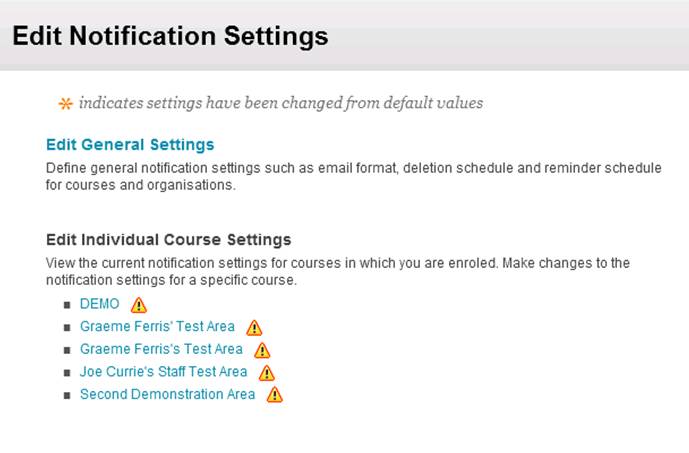
The Edit Notifications Settings link takes you to a page where you have 3 options:
  1. Edit General Settings
    This option allows you to choose whether to receive email notifications individually or as a daily digest. You can also choose when to remove notifications from the module and whether you wish to receive due-dates reminders X number of days before any due date.
  2. Bulk Notifications Settings
      This option shows the default notifications applied to all module areas. You can use this options to change the defaults for all or some of your module areas. You can turn off the existing email notifications or add further email notifications. It is important to note that the Bulk Notifications Settings always shows the institutional defaults. Any changes made to notifications will be reflected in the individual courses listed in the "Edit Individual Course Settings" option.
  3. Edit Individual Course Settings
    This option displays the current notifications settings, reflecting any changes that have been made, for all your individual modules. Individual module notifications can also be edited from here. If a module's notifications settings have been changed from the institutional defaults, an exclamation mark symbol will be displayed next to that module.